What Do Volvo P24A0 and P249F Mean?
P24A0 means the DPF regeneration temperature control has reached its limit while the exhaust temperature is still too low. P249F means the system took too long to enter closed-loop DPF regeneration control.
On a Volvo D13, either code is a reason to check when the fault occurred, whether it is confirmed, and whether regeneration actually failed. Volvo has documented specific chassis configurations where these codes can turn on the check engine light during background aftertreatment operations, even while regeneration continues.
Before replacing the DPF or the Aftertreatment Hydrocarbon Injector (AHI), also known as the 7th injector, check the truck's configuration and diagnostic data. The codes alone do not identify a failed component.
How Does Closed-Loop DPF Regeneration Control Work?
On a Volvo D13 with an exhaust fuel doser, active soot regeneration works by having the AHI spray diesel into the exhaust ahead of the Diesel Oxidation Catalyst (DOC). The DOC burns that fuel and creates extra heat before the gas reaches the Diesel Particulate Filter (DPF).
In closed-loop mode the ECM watches exhaust gas temperature (EGT) sensors and trims the heat input as engine load and exhaust flow change.
The two codes hit different points in the process:
Knowing the difference keeps you from jumping straight to a clogged or damaged DPF. First figure out whether the system can make enough heat and whether the temperature readings are telling the truth.
Why Does a Volvo D13 Regen Temperature Stay Too Low?
Several parts of the aftertreatment system work together to generate and control the temperature required for DPF regeneration. A problem in any of these areas can interfere with the process.
1. AHI Injector
The Aftertreatment Hydrocarbon Injector (AHI), commonly called the 7th injector, supplies diesel fuel into the exhaust upstream of the DOC. The injected fuel must reach the catalyst in the correct amount and with proper atomization to generate the additional heat needed for regeneration.
Restricted fuel flow or poor atomization can leave the DOC with too little usable fuel to produce the expected temperature increase.
A dosing command from the ECM does not necessarily confirm that fuel has actually reached the DOC. The system should be checked using the applicable Premium Tech Tool (PTT) test.
Depending on the truck you may need to check:
AHI nozzle condition and fuel delivery.
AHI module operation, where fitted.
Fuel supply to the injector.
Air supply to the AHI system, where applicable.
Results of the specified dosing test.
If the AHI isn’t delivering fuel the way it should, the DOC won’t generate enough heat even when the ECM is calling for more.
2. Diesel Oxidation Catalyst (DOC)
The DOC is what turns the fuel from the AHI into extra exhaust heat for regeneration.
It still needs enough inlet temperature and a properly atomized fuel supply to do its job. A weak temperature rise across the DOC doesn’t automatically mean the catalyst is bad.
During the specified diagnostic test, compare:
Exhaust temperature at the DOC inlet.
Exhaust temperature downstream of the DOC, at the DPF inlet.
The temperature change after AHI dosing begins.
A weak temperature increase warrants further testing of both the DOC and the fuel-dosing system.
That comparison tells you whether the problem is short fuel delivery or the catalyst just isn’t making heat. Swapping the DOC without checking the AHI and the temperatures first is an easy way to waste money.
3. EGT Sensors
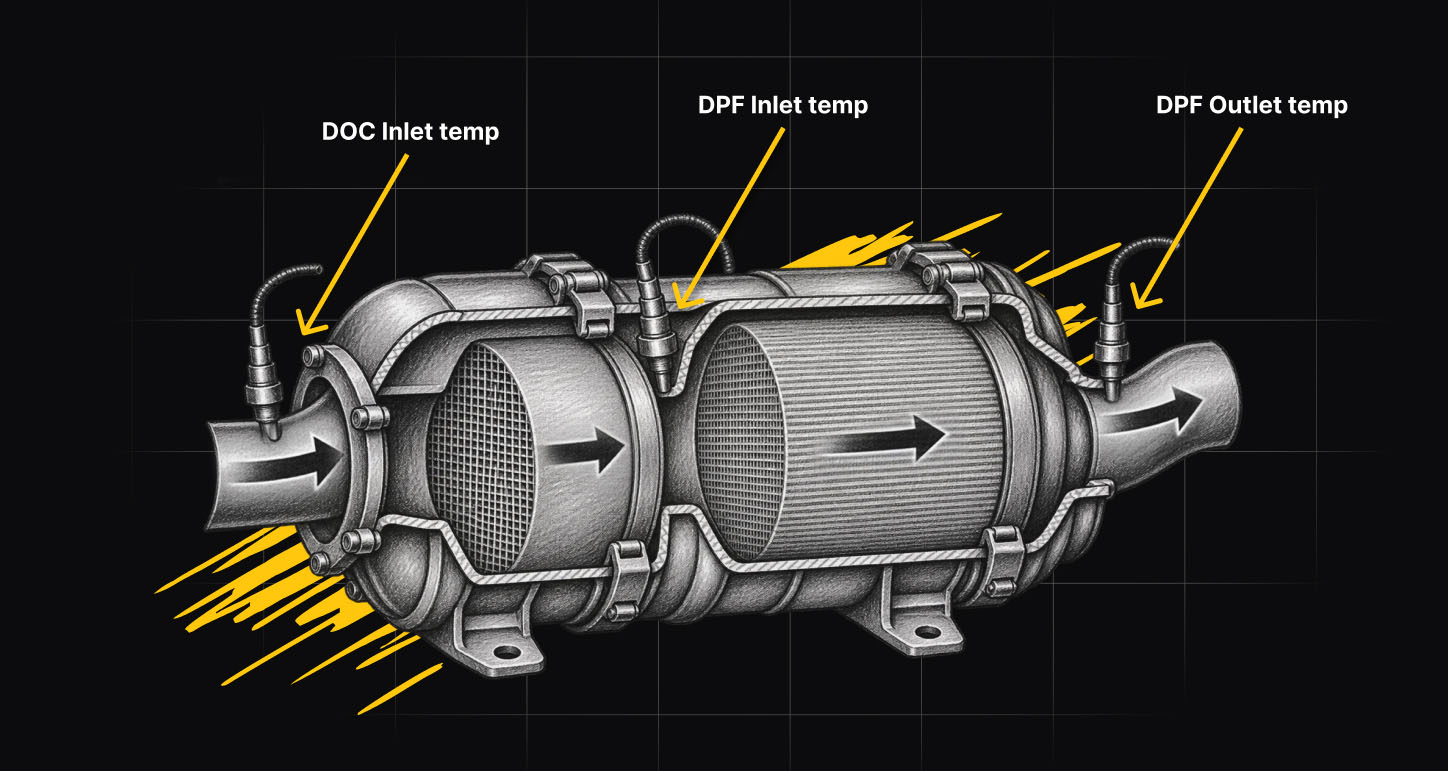
Exhaust Gas Temperature (EGT) sensors provide the temperature feedback used by the ECM and ACM to control aftertreatment operation.
If a sensor reports an incorrect temperature, responds too slowly, or produces inconsistent readings, the control system may not receive the information it needs to manage regeneration correctly.
Start with the engine and exhaust fully cooled. Using Volvo Premium Tech Tool (PTT), compare the EGT readings against ambient conditions and the applicable tolerance for that truck.
Then watch how the readings move during warm-up and, when the procedure calls for it, during the service test.
Watch for:
A reading that stays stuck while the others change.
Sudden or wild temperature swings.
A sensor that responds more slowly than expected.
Temperature readings that change in an incorrect sequence.
Connector or wiring problems identified during the applicable sensor test.
Keep in mind that temperatures at the DOC inlet, DPF inlet, and DPF outlet can differ substantially during regeneration. These readings should not be expected to match.
Always factor in where the sensor sits and how the exhaust is laid out on that particular truck before you decide what the numbers mean.
4. Engine and Aftertreatment Faults
DPF regeneration needs more than just the aftertreatment parts. Engine conditions and other active faults can keep the system from reaching the right temperature.
When P24A0 or P249F shows up, look through both the Engine Control Module (ECM) and Aftertreatment Control Module (ACM) for related codes covering:
AHI fuel delivery.
EGT sensors.
Boost and air management.
Exhaust Gas Recirculation (EGR).
Fuel system.
DPF differential pressure.
Aftertreatment control.
Do not automatically assume that every additional DTC is responsible for the regeneration problem. Check the complete fault code, its status, and any related symptoms in PTT.
Fix the active or confirmed faults that actually matter first. If the truck has no related symptoms and the target codes aren’t confirmed, follow the diagnostic steps for that specific chassis before you start testing or replacing parts.
Can Software Cause Volvo P24A0 and P249F?
Yes. Volvo has released ECM and ACM software updates addressing both codes on certain D11, D13, and D16 applications.
Two relevant Field Service Bulletins (FSBs) are:
Before replacing expensive aftertreatment components, check whether the truck falls within the applications covered by these bulletins.
Use the VIN or chassis info in Volvo Premium Tech Tool (PTT) to check:
The truck's emissions configuration.
Whether the applicable service bulletin covers the vehicle.
The currently installed ECM and ACM software levels.
Whether a newer software version is available.
These updates do not apply universally to every Volvo D11, D13, or D16. Always verify applicability and follow the instructions for the specific truck rather than applying a generic calibration.
What Is Sulfur Regeneration?
Sulfur regeneration is a separate aftertreatment operation from normal DPF soot regeneration.
According to Volvo service solution K86412082, P24A0 and P249F can occur during certain background aftertreatment operations involving the AHI. These include moving crystal sublimation and, on affected US17+OBD16 common-rail chassis, moving sulfur regeneration.
On the vehicles described in the bulletin, the check engine light could illuminate while the regeneration process continued.
This is an important distinction. The presence of P24A0 and P249F does not automatically mean that a parked DPF soot regeneration has failed.
For the affected US17+OBD16 common-rail configurations, the bulletin calls for checking the software level and describes a sulfur regeneration procedure using Volvo PTT as a temporary way to resolve the codes.
If these codes appear, identify the truck's exact emissions configuration and follow the current Volvo procedure applicable to that vehicle. Do not assume that performing a standard parked DPF regeneration will address the underlying condition.
Volvo D13 Regen Takes Too Long: What Should You Check?
If a Volvo D13 keeps trying to regenerate, takes forever to finish a cycle, or sets P24A0 or P249F, work through a structured diagnostic sequence instead of just throwing parts at the codes.
These checks help show where the regeneration process is getting stuck or why the temperature won’t climb.
1. Read the ECM and ACM codes in PTT.
Record all the DTCs and their status. Determine whether regeneration actually failed, was inhibited, or continued while the check engine light was on. Look at the fault history and related codes before you move on to component testing.
2. Confirm the truck's configuration and software.
Identify the emissions level and the chassis configuration. Check whether Volvo FSB 284-064 or FSB 284-065 applies and verify the installed ECM and ACM software levels. Address other relevant active or confirmed faults and related symptoms first.
3. Check operating conditions and EGT data.
Check the engine coolant temperature and the conditions the truck needs for regeneration. Start by comparing EGT readings with the engine and exhaust fully cooled. Then observe how the readings respond during warm-up and the applicable service test.
Inspect the exhaust for leaks upstream of the aftertreatment system where indicated by the diagnostic procedure.
4. Verify AHI operation.
Use the applicable PTT test to confirm whether the AHI system is delivering fuel as required. Check the nozzle, module where fitted, and fuel and air supply according to the test results.
Remember that an ECM dosing command alone does not confirm successful fuel delivery.
5. Check the DOC temperature response.
Compare the temperature at the DOC inlet with the temperature downstream of the catalyst at the DPF inlet during the specified test.
See whether the temperature rise matches what that truck’s configuration should produce. If it doesn’t, dig deeper into the dosing system and the DOC.
6. Review DPF restriction and soot load.
Check the calculated soot load and DPF differential pressure under the specified test conditions.
IIn case pressure readings seem implausible, check the differential pressure sensor and related lines before drawing any conclusion regarding the DPF restriction.
7. Verify the results.
After you fix the problem you found, recheck the DTC status and regeneration performance with the appropriate Volvo diagnostic test.
Only run a service regeneration when the truck meets the required conditions and the applicable Volvo procedure says to do it. Follow Volvo’s instructions on vehicle location, exhaust temperature, and safety.
A structured approach helps avoid unnecessary replacement of expensive aftertreatment components and makes it easier to identify the actual reason regeneration is taking too long.
Important
P24A0 identifies a temperature-control limit, while P249F indicates that entering closed-loop regeneration control took too long.
Neither code alone identifies a failed DPF, DOC, or AHI injector. Use the diagnostic results to determine whether the problem involves fuel dosing, catalyst performance, temperature sensing, engine operating conditions, DPF restriction, or ECM/ACM software.
Also, always check the fault status and Volvo service information for the specific chassis. On certain configurations, these codes can appear during background aftertreatment operations even when regeneration continues.
FAQ
Is P24A0 always caused by a bad DPF?
No. P24A0 can set when the regeneration system reaches its temperature-control limit while the exhaust temperature is still too low. The DPF itself may be functioning normally. Look at the fault history and related codes before you move on to component testing.
What does P249F mean on a Volvo D13?
P249F means the system took too long to enter closed-loop DPF regeneration control. Use Volvo PTT to confirm when the code set and whether it relates to a failed regeneration or a background aftertreatment operation covered by a Volvo service bulletin.
Can a bad AHI injector cause P24A0?
Yes. Restricted fuel delivery or poor fuel atomization can reduce the heat generated at the DOC. Use the applicable PTT test to check the AHI nozzle and its fuel and air supply, where fitted.
Should I replace the DOC when P24A0 appears?
Not immediately. For first verify the EGT readings, AHI fuel delivery, and DOC inlet temperature. Then compare the temperature increase across the DOC with the expected response for that truck. A low temperature increase alone does not confirm a failed catalyst.
Can low engine temperature cause Volvo P24A0?
Low coolant temperature can keep a truck from meeting the conditions needed for a parked regeneration. Check engine warm-up and the truck’s operating conditions, then see whether regeneration was inhibited or started without enough exhaust heat.
Can an EGT sensor cause Volvo P249F?
Yes. An implausible EGT signal can interfere with regeneration control and delay the transition into closed-loop operation. Compare cold temperature readings and their response during warm-up or the specified service test. Use any sensor-related DTCs and the test results to narrow down the problem.
Why does my Volvo D13 keep trying to regenerate?
It is possible the truck is retrying a regeneration that was interrupted. It is also possible that the ECM is attempting regeneration due to conditions present or soot load. Verify the regeneration history, calculate soot load, monitor DPF differential pressure, and pull related DTCs before determining which system needs further diagnosis.
Can exhaust leaks cause low DPF regeneration temperature?
An exhaust leak upstream of the aftertreatment system can change the conditions at the DOC inlet and affect both temperature readings and regeneration performance. Inspect for leaks during the initial checks and verify the temperature response after any repair. A low temperature reading alone won’t tell you there’s a leak.